Your controller. A clear PC setup.
Start with compatibility, prepare the controller route, then test assistance. No terminal or mandatory calibration session.
No injection · No game-memory reads · Instant delivery · Trained for Fortnite
Reviewed October 1, 2026 · By NeyraX · Check current release details
This page is for controller players considering NeyraX on a Windows PC. The app provides screen-based aim correction through a virtual controller; it does not replace Fortnite settings or repair an unreliable controller.
Before installing, check that your controller works normally without NeyraX. A model name alone does not prove compatibility: connection mode, driver support and other remapping software can change what Windows receives.
The setup we support today
Windows 10/11 64-bit, a compatible XInput controller, 16 GB RAM and a dedicated DirectX 12 NVIDIA or AMD GPU with at least 4 GB VRAM are the recommended starting point. They are not a guarantee of performance. Fortnite and recognition share your GPU; integrated graphics are not recommended.
Use one compatible XInput controller. If you are unsure about a particular controller or adapter, ask support before purchase. Direct console use and keyboard-and-mouse output are not included in this release.
Start NeyraX before opening Fortnite
Close Fortnite and other controller remappers. Install NeyraX from the official download page, activate your license and complete any required controller-component setup. If Windows requires a restart, finish it before continuing.
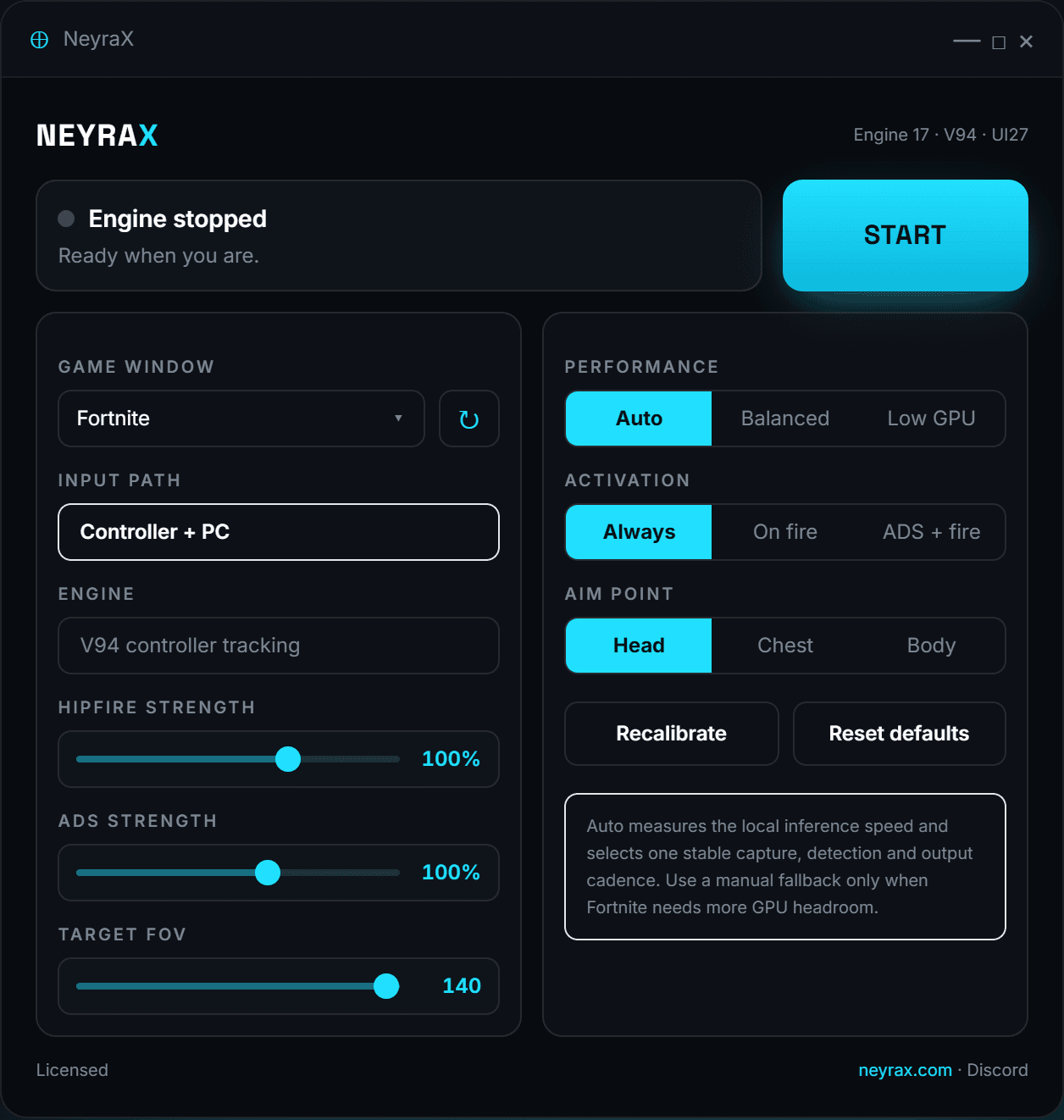
With Fortnite still closed, press START NEYRAX. Wait for the app to confirm that the controller route is prepared and that you may open the game. Do not treat a waiting-for-game label or a running window as proof that setup succeeded.
If setup fails, keep Fortnite closed and use the displayed status or support ticket to diagnose it. Do not disable Windows security or manually hide random devices. Capture the exact error and app version for support.
What the strength controls actually change
Hipfire strength and ADS strength scale the added correction separately. In the current customer profile, 0% disables correction for that mode and 100% retains the profile correction. These sliders do not set Fortnite sensitivity or scale your physical trigger input.
Target range limits target acquisition and correction. It is not your game camera field of view. Start with the defaults, change one control at a time, and compare the same movement with assistance off and on.
Separate controller faults from aim behaviour
If the camera turns without your intent, first compare normal controller operation with assistance stopped. Drift, duplicate input and a correction toward an unintended target are different faults and should not receive the same fix.
For help, include your controller and connection type, GPU, app version, the exact error and whether it occurs with assistance stopped. Send diagnostic files privately through support; do not post your license key publicly.
Day pass or monthly access?
The $9.99 day pass is a one-time purchase. Monthly access is $39.99 per month and renews until cancelled. Manage cancellation in Account. Test compatibility before choosing recurring access; a day pass does not automatically become a subscription.
Third-party aim software can violate game or platform rules and can lead to account restrictions or bans. Screen capture and virtual-controller output do not make it permitted or undetectable. Check the applicable rules before buying or using it.
How NeyraX is evaluated
Read the target scenarios, supported hardware and honest product limits behind each release.
Every customer update
See the public engine, model, input-safety and interface history before buying.
Verify your controller setup
Check Fortnite settings, gyro, mixed input and double-controller output in the right order.
Why players switch to NeyraX
Real neural detection
Detects enemies locally in real time, with cadence determined by your GPU and selected performance profile.
Stabilized tracking
Designed to reduce detector jitter; results still vary with scene, settings and capture timing.
External architecture
No injection and no game-memory reads. The supported path outputs through a virtual controller.
Flick assist
Supports controller corrections during aim movement. Flick-shot accuracy and freedom from overshoot are not guaranteed.
Controller-native
Corrections blend with stick input. Stop assistance if movement becomes unintended and check the setup with support.
Windows installer
Includes the app runtime and controller-component setup. Windows approval or a restart may be required; no Python setup or terminal is needed.
Choose access that fits your setup
Day and lifetime access are one-time purchases. Weekly and monthly plans renew until cancelled in Account.
A capable Windows gaming PC is required. For a good experience, use a dedicated DirectX 12 NVIDIA or AMD GPU with at least 4 GB VRAM, 16 GB RAM and a modern 4-core CPU. Integrated graphics are not recommended. View full requirements.
The public release requires an Xbox-style controller that Windows reads through XInput. Direct PS5 USB support is currently in a private support trial. Check with us before buying for a PS5 controller.
Auto-renews until cancelled. Manage billing in Account.
Questions, answered
Should Fortnite be open before I press START?+
No. Keep it closed during controller preparation. Press START NEYRAX and follow the readiness message before opening Fortnite.
Do I have to calibrate before playing?+
No mandatory calibration session is required by the current customer profile. Start with the supplied baseline settings.
Does every controller work?+
No universal compatibility is promised. The supported path requires a compatible XInput device; check your exact setup with support if uncertain.
Can I use this directly on PlayStation?+
No. The current customer release is for a controller connected to a Windows PC.
Can I cancel monthly access?+
Yes. Manage the recurring subscription through Account. Cancellation stops future renewals; review the billing portal for the end of your current paid period.